


Every e-commerce business needs great product pages to show buyers their offerings. Good product page SEO is important to achieve this and attract more organic traffic.
This guide provides 21 tips to help you optimize your pages for success. It also explains how to have the right keyword strategy and convert site visitors into loyal customers.
Effective product page SEO starts with a website that’s easy to navigate and fully customizable. Website builders provide the tools you need to create fast, responsive, and search-friendly product pages. Check out our recommended website builders to launch a site that’s optimized for both users and search engines.
Build SEO-Optimized Product Pages with the Best Website Builders
| Provider | User Rating | Recommended For | |
|---|---|---|---|
 | 4.6 | Beginners | Visit Hostinger |
 | 4.4 | Pricing | Visit IONOS |
 | 4.2 | Design | Visit Squarespace |
Why Effective Product Page Optimization is Crucial for e-commerce Sites
Before anything else, let’s look at why e-commerce stores need to optimize their product pages.
The Booming E-commerce Landscape
The world’s e-commerce industry should reach $4.8 trillion by 2025. This quick growth opens doors for online businesses to enter the industry. However, this also means more competition for every search query and customer.
Hence, it becomes important to optimize your product page to stand out from others. This is also the only way to rank well and convert visitors to loyal customers.
Use the Pareto Principle for effective product page optimization. This involves optimizing 20% of product categories that bring 80% of your income first. This will give you maximum impact in the market.

Building Your Store on a Solid Foundation
You need to build a fast, reliable, and secure online store to optimize product pages. This store serves as the foundation for a better customer experience. It is also the pillar of your site’s technical health.

The hosting provider has a direct impact on a site’s search engine rank. Search engines favor fast-loading websites. Mobile devices also struggle with slow-loading pages.
This makes it vital to choose the best web hosting to get a better page speed. Your hosting service will ensure your site is always available. Most importantly, it makes it possible to handle traffic spikes for better SEO and conversions.
As a beginner, you can easily start with website builders. User-friendly options like Hostinger or IONOS offer all-in-one solutions to help you. You can also take it a notch higher with tools that satisfy more advanced needs.

A dedicated e-commerce platform or a self-hosted WordPress site provides great flexibility for this.
21 Actionable Tips for High-Converting e-commerce Product Pages
Now, let’s look at the tips to help you create e-commerce product pages that convert well.
1. Master Your Keyword Research and Strategy
Every SEO strategy starts with good keyword research. Proper research shows you your target and how to hit it.
Focus on keywords used by buyers looking for a product. These search query phrases often include brand names and model numbers. They can also include buying-related words like “buy,” “price,” or “review.”
For example, “Nike Air Max 90 white size 10” shows that the user is ready to buy more than “running shoes.”
Get data on high-converting keywords and ad copy using paid search campaigns. These keywords will give you an idea for effective meta descriptions. Your Google Ads data shows you which terms drive sales and traffic.

Large e-commerce sites can gather product data like SKUs, brands, and categories. This approach helps you perform automatic keyword research across thousands of product pages.
Also, long-tail keywords often increase conversion rates. This is due to the fact that they are more specific in the search intent.
2. Optimize Title Tags and Meta Descriptions
All the important product pages must have interesting title tags and meta descriptions. These elements are what the people see first on Google’s search results. They directly affect the click-through rates.
Title and Description Best Practices:
- Length of Title Tag: 30-60 characters (285-575 pixels)
- Meta Description Length: 70-155 characters (430-920 pixels)
- Content: It must contain the brand, product, and model number. There should also be a call-to-action in the description.
Your product page title tag should be easy to read and compelling. It should also include your relevant keywords naturally. Don’t stuff keywords to avoid ruining your user experience and search engine optimization.
You can use title tag templates to automate on large sites. These automated systems are perfect for basic optimization. However, you must tailor your best-selling products.
Understanding the purpose of a meta description will enable you to come up with snippets that will make people click.
You can also use AI tools to develop better meta descriptions. Ahrefs’ free generator can use your product details to do this while maintaining quality standards.

3. Craft Unique and Engaging Product Descriptions
You must never use general manufacturers’ descriptions. These descriptions make your product page blend into the crowd and don’t convince potential customers.
Do not simply copy the product description. Instead, something special and interesting about the product’s features and benefits.

Use clear headings and bullet points to organize the content. This will make it easier to read the title. Write the description to answer the expected questions from customers. Address the concerns and reasons that may make them hesitate.
In addition, your product descriptions should contain the language your target audience understands. Avoid using technical or complex terms unless your customers need them.
4. Implement Product & Review Schema Markup
Schema markup helps search engines understand different elements on your product page. This will earn you better rankings and more attractive search result displays. Add details like price, availability, and SKU in your Product schema.
This structured data enables search engines to display accurate product information in search results. Also, include the Review and aggregateRating schema to show your site’s star ratings in the SERPs. This approach helps to improve click-through rates.
Most importantly, always test your markup before deployment. Google’s Rich Result Test can assist you in checking whether your schema markup is in the correct format.

5. Use High-Quality Images and Video
High-quality images matter in persuading online shoppers to purchase the products. Visual content makes online and in-person shopping experiences feel the same.
Showcase different angles of products through lifestyle shots. Also, enable users to zoom in on details. Different angles enable customers to see what they’re purchasing in detail. This reduces the volume of returned items and increases satisfaction.
Add product videos to show its features or provide a 360-degree view. Showing the product in action can increase conversion rates. These high-quality product images and videos build trust. They give the customer confidence in their decision to purchase a product.
In addition, you should provide various visual information to support the stages of the customer journey. Early-stage browsers need to see something different from someone ready to buy.

6. Complete Your Image Optimization Checklist

Image optimization has a direct impact on your organic traffic. It makes it possible to discover your content through Google Images. The following is a checklist of all that you require to optimize your image to a product page SEO:
- Descriptive file names and alt text: Include relevant keywords in image file names and alt text. For example, instead of IMG_001.jpg, use nike-air-max-90-white-running-shoe.jpg.
This will facilitate access to products by the visually impaired users. It also assists in improving image search ranking.
- Modern formats: Use modern, efficient formats like WebP to serve images. This will improve load times without losing image quality. Unlike the regular JPEG or PNG files, these image formats reduce file sizes by 25-50%.
- Compression and sizing: Compress images to reduce file size. Make sure they appear on the user’s screen with the correct dimensions. Oversized images waste bandwidth and reduce page speed. This is especially important for mobile devices.
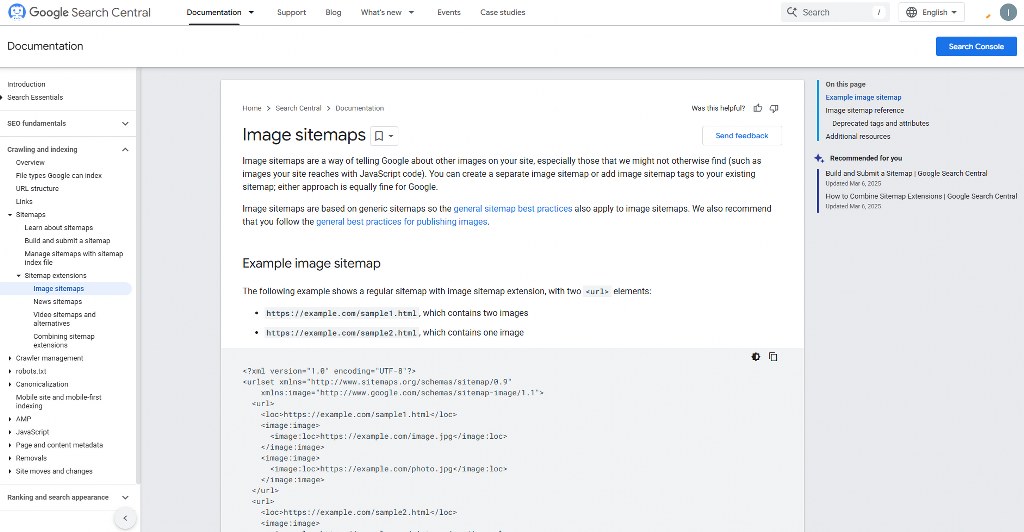
- Image sitemaps: Use a dedicated image XML sitemap to add your images. This will make Google discover and index them. e-commerce websites with thousands of product images need this step most.

7. Prioritize and Improve Page Load Speed
Your page speed is a valid tool to get a better ranking and enhance user experience. Search engines favor websites that provide better experiences through quick loading.
A Google study found that the possibility of mobile visitors bouncing increases by 123% as page load time increases from 1 to 10 seconds. This increase shows the importance of speed in engaging potential customers.
Modern online shoppers expect instant results. Hence, you should aim for three seconds or less to maintain top performance. Use a content delivery network and improve assets like images and JavaScript.
Also, use browser caching to improve speed. Ultimately, the correct tips for speeding up your website will enhance your sales and profit margin.
8. Create a Good Internal Linking Framework

Strategic internal linking enables the search engines to know the most crucial pages on your site. Internal links guide both users and crawlers through various web pages.
Connect the brand name to the main brand page to link product pages to category pages. This strategy assists in establishing connections among various sections of your e-commerce store.
Enhance user experience with such sections as “Related Products” or “Frequently Bought Together.” These sections create value and share link authority throughout your site. They make your internal link graph stronger.
Create contextual links leading to supporting products or key pages within product descriptions.
9. Add a Helpful FAQ Section (with Schema)

Add a Frequently Asked Questions section to answer the common questions of the customers. This section provides valuable information and builds customer confidence. It also adds valuable content that reduces the stress on your customer support team.
In addition, customers are likely to complete purchases when they find answers immediately. Mark up this content with the FAQPage schema. This will render your page valid for an enriched FAQ rich snippet in Google search results.
These rich snippets make your site more visible and make your click-through rates higher.
Review questions directed at your customer support and product reviews to create FAQs. Also, check various return reasons to identify important questions to answer.
In addition, you can target relevant keywords with well-crafted FAQs. This strategy especially works for those FAQs that don’t fit into your product description. This way, you can capture more search traffic and provide value to users.
10. Incorporate Social Proof with Reviews and UGC

Showing reviews from previous customers can increase conversion rates by up to 270%. These reviews are the social proof that makes online shoppers feel confident about buying items.
Product pages containing customer reviews see about a 52.2% conversion lift. This massive change shows the power of customer feedback in driving sales.
Add testimonials and expert recommendations of real customers to your page. You can also build credibility with user-generated content like customer photos. Real customer photos perform better because they show products in relatable situations.
Make sure to use the review schema to obtain star ratings. This will make your page appear in Google’s search results. Such social proof can positively affect your click-through rates.
11. Strategically Manage Product Variants

Having separate, indexable URLs for every variant of a product can lead to duplicate content. This can also dilute your ranking potential.
It is best to use one primary URL for variants with low search demand. You should also merge tags to link the variant pages to the primary one.
This strategy prevents different pages from competing against each other for the same keywords. Handle variants based on user search behavior.
For example, you may need separate pages if people search for “red iPhone 14 Pro” instead of “iPhone 14 Pro.” However, merging the pages will work better if color isn’t a major search factor.
In addition, you should use a logical structure for product page URLs. These clean URL structures make it easier to crawl and index your product catalog.

12. Handle Out-of-Stock and Discontinued Products

Your product page should account for seasonal products. You don’t need to delete the pages for annual items.

Deleting these pages will force you to rebuild SEO authority every year. Instead, you should update them with the next season’s information.
- Temporarily out-of-stock: Clearly label the product as “out of stock” to alert customers. Remove the “add to cart” button and offer an email notification option for when it’s available.
You should also suggest relevant products as alternatives to engage customers.
- Permanently discontinued: Redirect customers to the most relevant category for a page that has SEO value. You can also redirect them to a replacement product.
If the page has no value, use a 410 “Gone” status. This will make search engines remove it from their index.
As an e-commerce site owner, you need to always track your out-of-stock products. This will enable you to improve customer satisfaction. You may offer pre-orders for popular out-of-stock items.
This strategy keeps your customers interested and provides valuable sales data to plan your inventory.
13. Use XML Sitemaps with <lastmod>
Sitemaps are a guide for search engines to navigate large e-commerce sites. Make sure to include your official product pages in your XML sitemap. This approach will help Google find and crawl them efficiently.
Send a signal to Google when you change a page’s content using the <lastmod> attribute. This information helps the search engine to focus more on crawling updated pages. It will also help you save more money on crawl and indexing changes faster.
Make sure to submit your sitemaps through Google Search Console. The submission will allow you to monitor indexing and detect crawling problems. This way, you will be able to identify and address issues before they impact your SEO performance.

It would help large e-commerce sites to group sitemaps by product categories or update frequency. This approach helps search engines understand your site structure.
14. Use a Clear, Semantic Heading Structure
The headings play a crucial role in making your content understandable to the users and search engines. A clean heading structure will help the shoppers to access and scan your content easily.
Use one H1 for the main product name as the page’s main title. More than one H1 tag can make your main focus confusing.
Use H2s for major sections to organize your content and provide keyword openings. These are features, specifications, reviews, and Frequently Asked Questions sections.
Place H3s and H4s under their parent headings to establish a hierarchy. This structure will make it easier for users and search engines to navigate your content.

15. Add Breadcrumb Navigation (with Schema)
Breadcrumbs show visitors where they are in your site’s hierarchy. This navigation aid makes it easier for customers to find related products.
They also create a line of internal links for search engines to understand your site structure. Parent category pages get authority and context from each breadcrumb.
In addition, breadcrumbs should show how you arrange your site. Confusing or inaccurate breadcrumbs can mislead search engines. It can also create poor user experiences.
Make your breadcrumbs valid for the SERPs by marking them with the BreadcrumbList schema. A breadcrumb-rich snippet can improve your click-through rates.

Your home page should be in breadcrumb trails to achieve better internal linking. This will facilitate the ease of navigation to your main landing page.
16. Use Semantic HTML for Product Details
Semantic HTML makes it easier for every user to access your product pages. Use semantic HTML to give your content more context. Search engines can understand and group your product information with a proper HTML structure.
Use tables to show the technical specifications of products. You can also define lists with <dl>, <dt>, and <dd> tags. These HTML elements indicate that the content contains specifications or definitions.
Help search engines analyze and understand the data on your page using unordered lists. This comes in handy for feature bullet points. Proper list markup makes it easier to access and structure your content.
You can increase the search engine understanding by including microdata or JSON-LD structured data. Combining these elements provides several layers of context for your product information.

17. Always Write Your Own Product Descriptions
Never use the manufacturer’s description that comes with the product. Several e-commerce sites are more likely to use that same text. This will result in a duplicate content problem. Your products will also be unable to stand out from competitors.
Optimizing product pages is essential by writing unique, useful, and optimized copy. In this manner, you will be able to address certain keywords and talk to your customers directly.
These descriptions should bring out features that make your offering unique. This could be your warranty, shipping speed, or bundled accessories. Find ways to increase your value beyond the regular product features.
Even product descriptions should follow the principles of SEO content writing. Write with user intent, keywords and compelling calls-to-action.

Hostinger: Top Website Builder for Beginners
18. Allow Manual Overrides for Automation
Common automated titles and descriptions can affect your click-through rates. Hence, it is vital to create an opening to customize important places. This will ensure quality control.
It will also enable you to create keyword-rich titles and descriptions for high-revenue products.
Focus your customization on sections that will have the biggest impact. This includes key pages that attract the highest traffic and revenue. Invest your time on 20% of the products that influence 80% of your outcomes.
Always audit automated content to identify openings to improve manually. Use this opening to look for poor performing templates. Also, identify high-traffic pages with low conversion rates.
19. Don’t Kill Your Seasonal Pages
As mentioned before, don’t delete seasonal pages like “Black Friday Deals” or “Christmas Gifts” after the season ends. This wastes your former investments in SEO. It will also make you miss opportunities to capture early seasonal traffic.
Instead, update the page with a message about the next upcoming event. Amazon does this with its dedicated Black Friday URL. This strategy helps to maintain link integrity and domain authority throughout the year.

Optimizing for seasonal products can capture people planning for holidays and events. This is especially effective for shoppers to start researching seasonal products in advance.
Use off-season periods to improve your product page SEO for the following year. You can add new products, update content, and build extra links for added strength.
20. Prevent and Fix Orphan Pages
Orphan pages are web pages without any internal links leading to them. This makes them almost impossible for users and search engines to find. These lone pages waste SEO investment and create poor user experiences.
Orphaned e-commerce product pages often happen when you delete a parent category. They are also possible when the site structure changes without proper redirect planning.

However, regular site maintenance helps prevent too many orphan pages. Always audit your site to find and fix orphaned pages.
You can fix this isolation by linking to them from relevant categories or other product pages. In addition, you should identify the reasons the pages became orphaned.
Sometimes uncategorized product pages are a sign of a broader site structure problem. These problems need systematic solutions to resolve them forever.
Use SEO tools to identify orphaned content across your e-commerce site. Tools like Google Search Console will help you identify pages with poor internal linking. You can optimize these pages to get extra value through proper internal linking.
21. Link Product Attributes to Category Pages

Connect your product attributes to relevant category pages for better internal linking. This strategy distributes PageRank effectively and boosts user experience.
Link brand, material, or specific features to relevant filtered category pages. For example, link “waterproof” to your waterproof products category or “Nike” to your Nike brand page.
This funnels PageRank to important category pages. Thereby, helping them to rank for broader, high-volume terms. These broader terms often have more search volume and commercial value.
In addition, create regular linking patterns across your product catalog. You will need this to build strong topic authority in specific categories. This internal linking sends a signal to search engines that certain category pages are important.
Most importantly, track how these category pages perform. This will enable you to understand which internal linking strategies are perfect for your product catalog. You will also know what suits your customer behavior patterns.
Conclusion
Effective product page SEO is a skill that requires planning and creativity to gain loyal buyers. The good thing is that the strategies in this guide will make everything easier for you.
You only need to start with your highest-revenue products and keep monitoring results. Starting an SEO business can also help you tap into this growing industry.

Next Steps: What Now?
Follow these practical steps to optimize your product page
- Research relevant keywords for your product.
- Create optimized title tags and meta descriptions for each product.
- Use high-quality images and videos to show product attributes.
- Use schema markup to increase visibility.
- Use the right web hosting to improve page speed.
- Create a way to adjust key pages manually.
- Build internal links to category pages.
- Optimize pages containing seasonal products.
- Factor customer feedback into creating social proof.
- Track your SEO performance to identify areas needing improvement.
Further Reading & Useful Resources
Here are more resources for you:
- Lucrative e-commerce Product Pages: Identify 17 e-commerce pages that gain customers.
- Understanding Technical SEO: Learn what technical SEO means to website visibility.
- E-commerce Google Sites: Learn how to build an online store using Google Sites.
- SEO for subdomains: Make every page rank higher.
- Mastering SEO Strategies: Learn techniques to outrank your competitors.


