I was admittedly skeptical when I first discovered Namecheap’s shared hosting packages starting at $1.98/month. How could such affordable hosting deliver reliable service?
But after testing, migrating client websites, and pushing the limits of their features, I’ve found myself pleasantly surprised.
Let me be upfront: while Namecheap has a rating of 2.4 from 198 customer reviews in our Namecheap review on HostAdvice, my personal experience has revealed a different story. Their shared hosting platform strikes an impressive balance between affordability and performance, offering features typically found in more expensive plans.
We’re talking about unmetered bandwidth, AI-powered website tools, Supersonic CDN for faster loading times, and even eco-friendly data centers — all packaged with a free domain name and SSL certificate.
In this Namecheap shared hosting review, I’ll share why this might be the hidden gem you’re looking for.
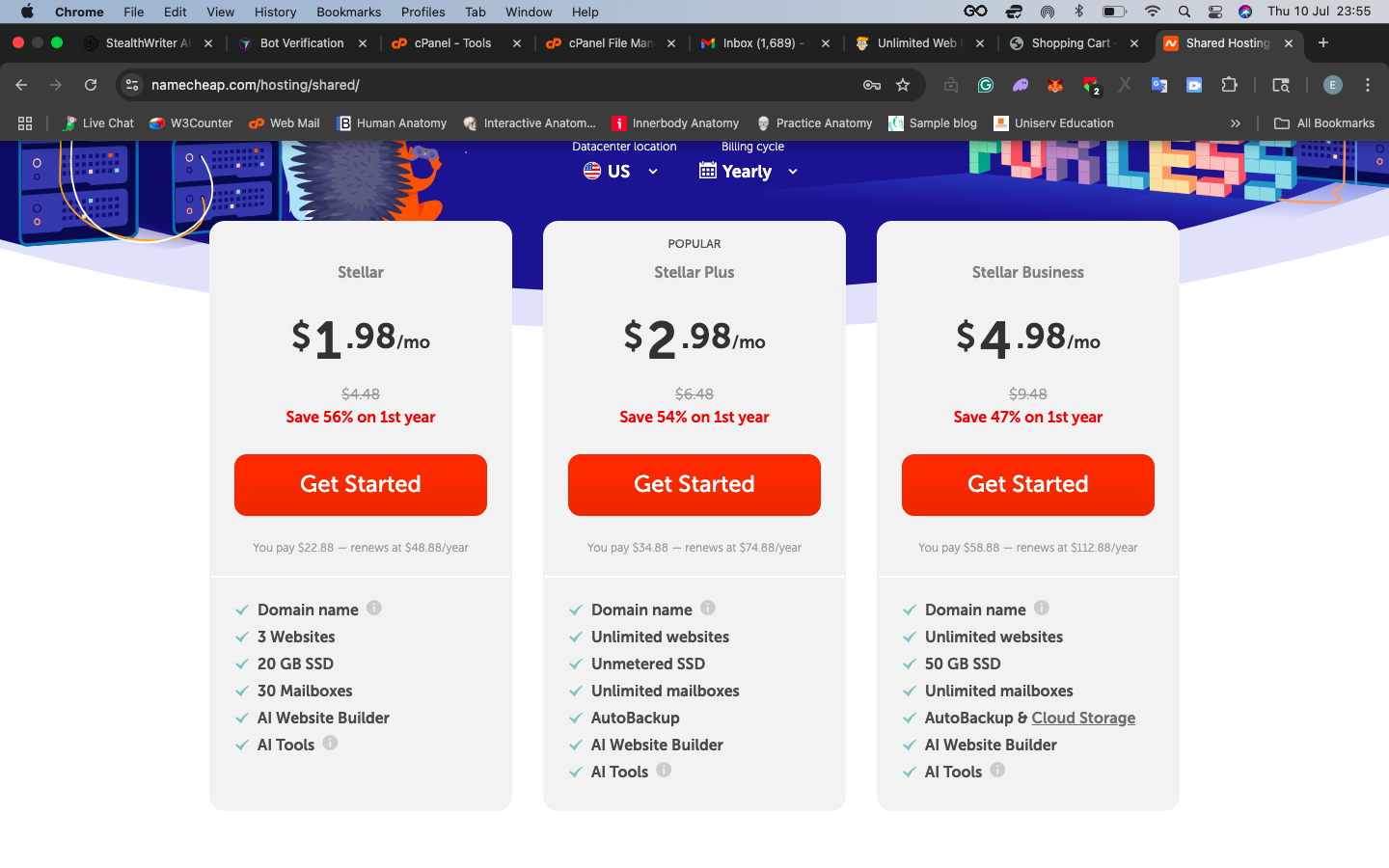
If you’re considering Namecheap Shared Hosting, you’ll be pleased to know that they offer three straightforward plans designed to suit a range of needs:
These plans are packed with features to get your website up and running efficiently, whether starting a blog, running an online store, or needing reliable hosting for multiple sites.
Namecheap Shared Hosting comes with a 30-day money-back guarantee, giving you enough time to test their performance and features risk-free. It’s worth noting that this guarantee applies only to your first hosting purchase—returning users won’t be eligible.
However, third-party software licenses like cPanel and Softaculous aren’t refundable.
You can choose from several payment options, including credit cards (Visa, MasterCard, Discover, or AmEx), and cryptocurrency. You can easily add funds to your account with a minimum of $5.00 ($1.00 for cryptocurrency) and a generous maximum of $100,000.
Let’s look at the plans in detail:
| Plan Name | Space | Bandwidth | OS | Panel | Number of Sites | Price | |
|---|---|---|---|---|---|---|---|
| Stellar | 20 GB | Unlimited | cPanel | 3 | NZ$3.48 | Details | |
| Stellar Plus | Unlimited | Unlimited | cPanel | Unlimited | NZ$5.24 | Details | |
| Stellar Business | 50 GB | Unlimited | cPanel | Unlimited | NZ$8.76 | Details |
Stellar Plan
The Stellar plan is the most budget-friendly option, starting at just $1.98 per month for the first year, totaling $22.88 annually. Upon renewal, it jumps to $44.88 per year, which is still competitive.
With this plan, you can host up to three websites, perfect if you’re starting small but want room to grow.
You also get 20 GB of SSD storage, ensuring fast site loading times. Other perks include 30 email mailboxes, an intuitive website builder, and handy AI tools to streamline your workflow.
Stellar Plus Plan
Stepping up to the Stellar Plus plan gives you more flexibility. Here, you can host unlimited websites and enjoy unmetered SSD storage, so you won’t have to worry about running out of space.
Plus, the plan includes unlimited mailboxes and an AutoBackup feature, ensuring your data is safe and easy to restore. You can also access Namecheap’s website builder and AI tools to simplify managing multiple sites.
Stellar Business Plan
The Stellar Business plan is the premium option. It’s tailored for businesses and heavy users, offering 50 GB of SSD storage—plenty of space for complex websites with rich media. You can host unlimited websites, set up unlimited mailboxes, and enjoy the AutoBackup & Cloud Storage feature for maximum reliability.
Like the other plans, you’ll have access to a website builder and AI tools, making this plan an all-in-one solution for growing businesses.
To evaluate the infrastructure of Namecheap shared hosting, I decided to test the performance of their website using GTmetrix and Google PageSpeed Insights.
While these results may not directly reflect the performance of their shared hosting plans, they provide a useful glimpse into the hosting infrastructure’s speed, stability, and optimization capabilities. Here’s what the results reveal about their shared hosting infrastructure.
Testing the Namecheap website on GTmetrix revealed impressive performance metrics:

The low Time to First Byte (TTFB) of 121ms highlights a robust backend system, ensuring quick server responses. This is a strong indicator of solid server infrastructure and optimized configurations, likely supported by their use of SSD storage and advanced caching technologies.
The overall onload time of just 1.0 seconds and smooth visual stability suggest that Namecheap has invested in a well-optimized environment, which benefits users hosting websites on their shared plans.
The PageSpeed score also reinforced the solid infrastructure of Namecheap shared hosting:

Key metrics like Largest Contentful Paint (1.0s) and Speed Index (1.1s) show that the servers are configured to handle dynamic content efficiently. With a Total Blocking Time of 360ms and a perfect Cumulative Layout Shift score of 0, Namecheap’s infrastructure ensures smooth interactions and fast content delivery.
These metrics align with the expectations of modern web hosting.
The performance results indicate that Namecheap shared hosting is built on a stable and optimized foundation. Here are some infrastructure strengths:
While these tests don’t reflect every nuance of shared hosting performance, they paint a positive picture of Namecheap’s infrastructure.
The low response times, efficient content delivery, and stable metrics suggest a hosting environment capable of easily supporting small to medium websites.
Namecheap shared hosting offers a range of support options to ensure you get the help you need, no matter when or where you encounter an issue.
I tested every support channel offered to give you an honest review of my experience so you can know exactly what to expect.
To access the live chat, click the chat bubble on the bottom-right corner of the Namecheap website.
Once there, you can select the support you need—in my case, I chose hosting. I asked about hosting multiple WordPress sites and cPanel availability.
I was connected with an agent, Ramakrishna, almost instantly. The response time was impressive, and the agent was polite, knowledgeable, and provided direct answers. They shared relevant links to guides on cPanel and WordPress Multisite, making it easy to learn more without needing follow-ups.

Overall, the live chat left a great impression. It’s quick, efficient, and provides a real-time solution for immediate queries. If you need fast answers, this is your best option.
Response time: Instant connection with an agent within seconds.
Customer service level: Excellent. Friendly, professional, and thorough.
The help desk allows you to browse the extensive knowledge base, read announcements, and submit support tickets. It’s great for more complex or non-urgent issues.
I submitted a ticket by emailing support@namecheaphosting.com with the same question I asked in the live chat. I immediately received an automated message acknowledging my request, along with a ticket ID. This gave me confidence that my query was in the queue. The automated response was professional, but the real test will be in the actual reply.
I received a detailed and polite reply at 2:52 PM, making the response time approximately 1 hour and 18 minutes.
The reply was courteous and well-structured, beginning with a friendly greeting and acknowledging my query. It provided clear answers to my questions and included helpful links for further reading:
The information was comprehensive and showed attention to detail. It was tailored to my query rather than a generic, templated response.

While the response wasn’t immediate, an hour and 18 minutes is reasonable for email support, especially for non-urgent inquiries. However, it’s slower compared to their live chat support, which provides answers instantly.
Namecheap offers free migration for hosting accounts from any cPanel-based provider. The process is handled by their migration specialists, ensuring a smooth transition.
Having free transfer assistance is a huge plus for anyone switching hosts. Knowing that experts handle the migration adds peace of mind, especially for those unfamiliar with the technical side of hosting.
Ease of access: Reach out via live chat or the help desk to request migration assistance.
After purchasing a plan, the setup is automatic. Your cPanel login details are provided in the welcome email, allowing you to dive in immediately.
This feature makes onboarding hassle-free. Having the setup process automated means you can skip any lengthy delays and start building your site right away.
Ease of access: Check your email for instructions after your purchase.
In addition to live support options, Namecheap shared hosting provides an extensive collection of self-help resources, making it easy to find answers without needing to contact support. Here’s how each resource performed during my review:
Namecheap’s knowledge base is a treasure trove of articles covering a wide range of topics, from getting started with hosting to advanced configurations.
The articles are well-structured and include step-by-step instructions, screenshots, and links to related content. For example, I found detailed guides on using cPanel, installing WordPress via Softaculous, and managing multiple sites.

The knowledge base is comprehensive and beginner-friendly, perfect for users who want to troubleshoot or learn independently. It’s accessible via the support section on the Namecheap website, and you can search for specific topics, which saves time. For quick learning, it’s an excellent starting point.
Namecheap shared hosting offers solid support options, with live chat standing out as the fastest and most effective channel for real-time help.
The help desk is reliable for detailed issues, while features like transfer assistance and instant setup ensure a seamless user experience. If you value responsive, knowledgeable, and accessible support, Namecheap won’t disappoint.
When reviewing Namecheap shared hosting, I wanted to test how beginner-friendly the platform is. To do this, I explored the registration process and their control panel. I aimed to see how intuitive the process is for someone signing up and managing their hosting for the first time. Here’s how it went:
Signing up for Namecheap shared hosting was straightforward and hassle-free. To start, I visited the Namecheap homepage. From there, I hovered over the “Hosting” option in the top menu and selected Shared Hosting from the dropdown list.

Scrolling down slightly, I found the different shared hosting plans clearly displayed. I decided to go with the Stellar Plus plan, which is the most popular and offers the features I needed.
After clicking Get Started, I was taken to the next page, where I had to connect a domain name.

This step allows you to connect a domain name to your hosting plan. The interface was clean and easy to understand, with clear instructions. You have three options to choose from:
Since I already had a domain, I selected the Existing Domain Name. The platform guided me through the connection process without any complications. If you don’t have a domain, you can search for one directly on this page by typing your desired domain name into the search bar and adding it to your cart.
Once the domain step was complete, I reviewed my order. The plan I selected (Stellar Plus) was displayed clearly along with the price—$34.88 for the first year. After ensuring everything looked good, I clicked Add to Cart to proceed.
The payment process was just as simple. I entered my payment details, chose from options like credit card, PayPal, or cryptocurrency, and completed the purchase. Within minutes, I received a confirmation email with my order details.
The best part? Namecheap automatically sets up your hosting plan once your payment is processed. The welcome email included all the essentials, like my cPanel login details, making it easy to get started right away.
Overall, I found the registration process incredibly smooth and user-friendly. Every step was intuitive, with helpful prompts and minimal clutter.
Tip: Check your welcome email carefully—it contains your cPanel details, which you’ll need to start managing your hosting.
Once my Namecheap shared hosting account was activated, I received a Welcome Guide Email. This included everything I needed to get started—cPanel access details, information about Add-ons, FTP settings, and other essential references. Armed with this, I was ready to dive into the cPanel.
Namecheap uses cPanel 12.110 with the Jupiter Theme, designed to be intuitive and user-friendly, especially for beginners.

At the top, there’s a header with a search bar, user settings, and key account statistics.
Here’s what I found during my review:
The search bar at the top was a lifesaver. Typing the name of a tool or feature instantly brought up the relevant options, saving me from scrolling or hunting for specific functionalities. For example, when I wanted to find the Softaculous Apps Installer to install WordPress, all I had to do was type “Softaculous,” and it popped up immediately.

The center column is neatly categorized, with sections for Files, Databases, Email, Domains, Metrics, Security, and more.
Each category expands into a set of tools that make managing your hosting straightforward. This structure is especially helpful for those new to hosting because everything feels organized and approachable.
The File Manager was my go-to for uploading and managing website files. It’s essentially a web-based interface for organizing files, and it works seamlessly for tasks like editing files or checking directory privacy settings.
I also appreciated the Disk Usage tool, which gave me a breakdown of how much space my account used—a great feature for optimizing things.

Adding and managing domains was equally simple. The Domains section allowed me to add subdomains and redirect URLs with just a few clicks. If you’re running multiple sites, this section will make your life easier.
Setting up email accounts for my domains was also easy. The Email Accounts tool let me create professional mailboxes, set up forwarders, and configure auto-responders quickly. I also liked the Jellyfish Spam Protection, which provided an added layer of security for filtering out unwanted emails.

One of the standout features is the Softaculous Apps Installer, which makes installing applications like WordPress, Joomla, or Magento a matter of a few clicks. I tested the WordPress installation, and the process was smooth and fast. This feature is incredibly valuable for beginners or those looking to save time.
The cPanel interface is intuitive and has features catering to beginners and advanced users. The clean layout and the powerful tools available make it an excellent control panel for managing hosting accounts.
After thoroughly testing Namecheap’s shared hosting, here’s my honest verdict: Yes, I do recommend it, but with some considerations in mind.
I strongly recommend Namecheap shared hosting if you are:
I might not recommend it if you:
What truly impresses me is the value proposition. At $1.98/month for the basic plan, you’re getting features that often cost significantly more elsewhere: free SSL, CDN integration, AI tools, and unmetered bandwidth. The inclusion of a free domain name with annual plans adds even more value.
The standout features that sealed the deal for me were:
While it’s not perfect, the pros significantly outweigh the cons for most small to medium websites. The storage limitations on basic plans and higher renewal rates are minor drawbacks compared to the overall value you receive.
| Plan Name | Space | Bandwidth | OS | Panel | Number of Sites | Price | |
|---|---|---|---|---|---|---|---|
| Free Trial | Unlimited | Unlimited | Unlimited | NZ$0.00 | Details | ||
| Stellar | 20 GB | Unlimited | cPanel | 3 | NZ$3.48 | Details | |
| Stellar Plus | Unlimited | Unlimited | cPanel | Unlimited | NZ$5.24 | Details | |
| Stellar Business | 50 GB | Unlimited | cPanel | Unlimited | NZ$8.76 | Details |
| Description | Expert Review |
|---|---|
| Read Email Hosting Review | |
| Optimized WordPress hosting with fast speeds, enhanced security, and support. | Read Wordpress Hosting Review |
| Scalable VPS hosting with dedicated resources and full root access. | Read VPS Review |
| Powerful dedicated servers with full control, customization, and high performance. | Read Dedicated Server Review |
| Scalable reseller hosting with white-label options and flexible plans. | Read Reseller Hosting Review |
| Read Domain Registration Review |




Namecheap shared hosting is particularly good for small to medium websites. With prices starting at $1.98/month, you get impressive features, including free SSL certificates, unmetered bandwidth, AI website tools, and a free domain. While it’s not ideal for large-scale e-commerce sites, it offers excellent value for personal websites, blogs, and small business sites.
The number of websites depends on your plan. The Stellar plan allows up to 3 websites, while both Stellar Plus and Stellar Business plans support unlimited websites. Each plan has different storage allocations: 20GB for Stellar, unmetered for Stellar Plus, and 50GB for Stellar Business.
Yes, Namecheap shared hosting includes one-click WordPress installation through Softaculous. You can easily install and manage WordPress sites through cPanel. The hosting environment is fully compatible with WordPress and includes features like automatic backups and security measures to protect your WordPress site.
Namecheap offers a 100% uptime guarantee for their shared hosting services. While no host can truly guarantee 100% uptime, Namecheap maintains high reliability through redundant systems and multiple data centers. They also provide compensation if uptime falls below their guaranteed levels.
Yes, Namecheap offers free website migration within 24 hours for shared hosting customers. Their technical team handles the entire migration process, including databases, emails, and files. This service is particularly valuable for cPanel to cPanel transfers, though they also support migrations from other hosting platforms.

Answer a few simple questions and find the perfect solution for you!
Start Hosting Search